
Exalate expertise

Exalate to synchronize Jira with other tools
Ovyka supports organizations that need to synchronize tickets, requests, and work items across teams, tools, or companies.
Exalate can connect Jira with ServiceNow, Zendesk, Azure DevOps, Salesforce, GitHub, Freshdesk, or Freshservice depending on the connector, hosting model, and available capabilities. Each side retains control of its exchange rules.
Rules and operations
Design a synchronization that remains understandable and maintainable
Scoping must cover exchanged data, direction, transformations, responsibilities, and situations to handle as connected systems evolve.

Monitor connections and synchronization volumes
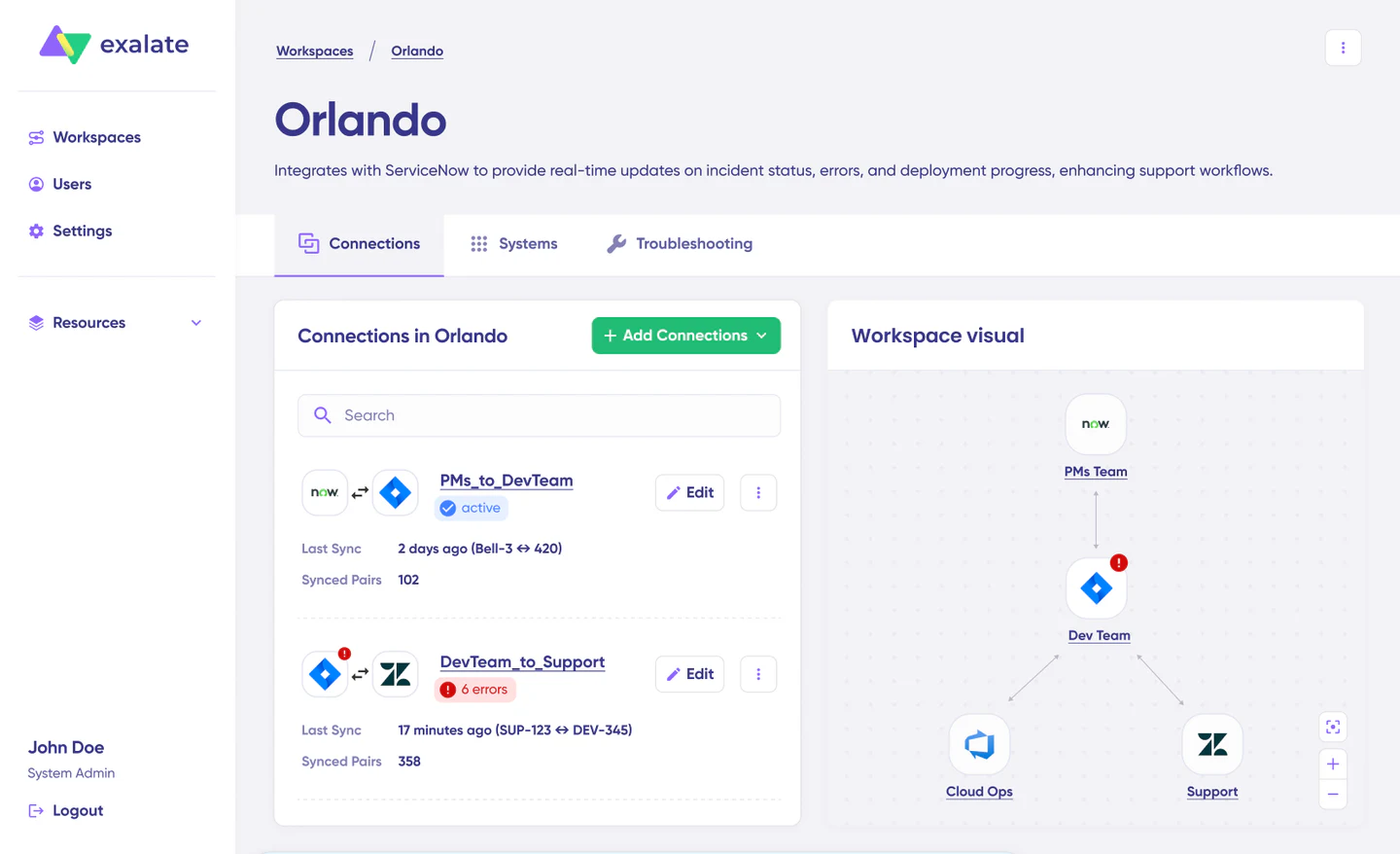
A network view helps teams review connected systems, synchronized volumes, and the status of each connection.
Rules, mappings, and exchange direction
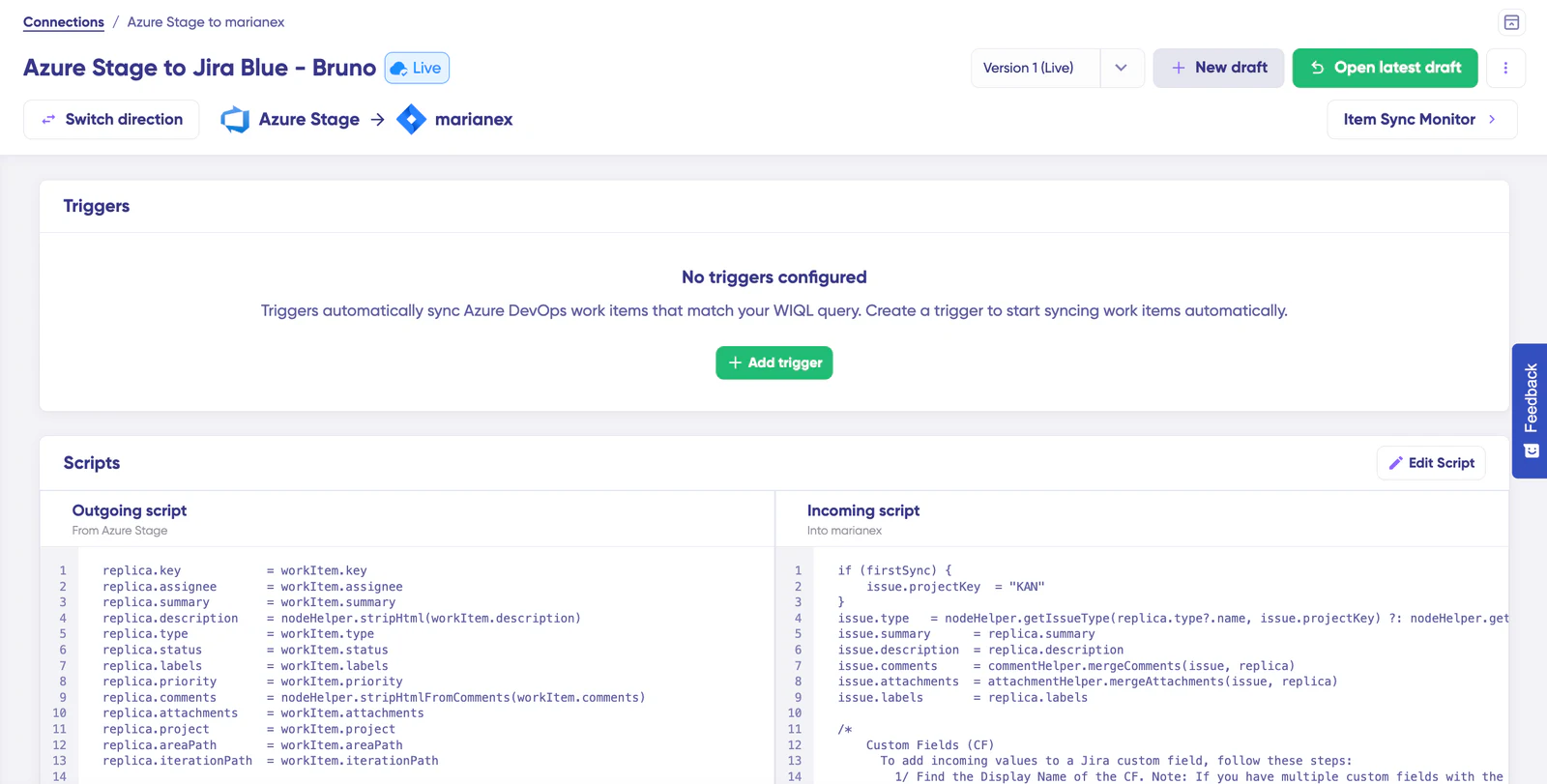
Each direction has its own triggers, incoming and outgoing rules, versions, and tests before publication.
Connectors to qualify for your environment
Availability, functional scope, and hosting options can differ by connector and product version.
- Jira
- ServiceNow
- Zendesk
- Azure DevOps
- Salesforce
- GitHub
- Freshdesk
- Freshservice
Synchronization / integration
What is Exalate for?
Exalate helps reduce duplicate entry and manual exchanges when several systems must track the same topic without exposing the whole environment.
Bidirectional synchronization
Move statuses, fields, comments, attachments, or business information inbound, outbound, or in both directions.
Control by each side
Define what goes out, what comes in, and how data is transformed on the source and destination sides.
Multi-tool setup
Connect Jira, ServiceNow, Zendesk, Azure DevOps, Salesforce, GitHub, Freshdesk, or Freshservice depending on available connectors and capabilities.
Cross-organization cases
Collaborate between customer, supplier, support, ITSM, and development without sharing application access.
Exalate
What Exalate brings
Exalate’s value comes from its decentralized integration model: each instance keeps its rules, permissions, and vocabulary.
Precise exchange model
Synchronized fields, direction, and transformations are explicitly defined for each use case.
Security and minimization
Sensitive information can remain local when it is not part of the exchange contract.
Controlled automation
Triggers and synchronization rules reduce manual rework while keeping business control.
From guided mapping to versioned rules
Accessible cases can start with guided mapping; advanced needs can use reviewed and versioned Groovy rules.
Jira / ITSM / support / dev
Frequent use cases
Ovyka designs synchronizations as real exchange contracts: scope, responsibilities, security, tests, and operations.
Customer and supplier
Synchronize requests, incidents, or defects between two organizations without opening internal tools.
Support and development
Connect support tickets and product backlog to track resolution, useful comments, and shared statuses.
ITSM and delivery
Align ServiceNow incidents, changes, or requests with Jira or Azure DevOps according to existing workflows.
Ovyka
Ovyka guidance
Ovyka brings the Jira, systems-integration, and data-governance experience required to avoid fragile or overly broad synchronization.
- 01 Identify systems, projects, object types, and each side’s responsibilities
- 02 Define the exchange model: fields, comments, attachments, statuses, and direction
- 03 Implement transformation, filtering, and security rules
- 04 Test nominal scenarios, errors, conflicts, and recovery cases
- 05 Document operations, monitoring, and incident-handling procedures
- 06 Train administrators and adjust rules after go-live
Operations / evolution
Monitoring, recovery, and evolution
A synchronization must be followed over time: volumes, workflow changes, added fields, errors, conflicts, and responsibilities evolve.
- Qualification of the connector scope and required capabilities
- Analysis of existing synchronizations and configurations
- Diagnosis of rules, errors, conflicts, and recovery scenarios
- Documentation of exchange contracts and responsibilities
- Synchronization evolution with Jira workflows and third-party tools
Operations
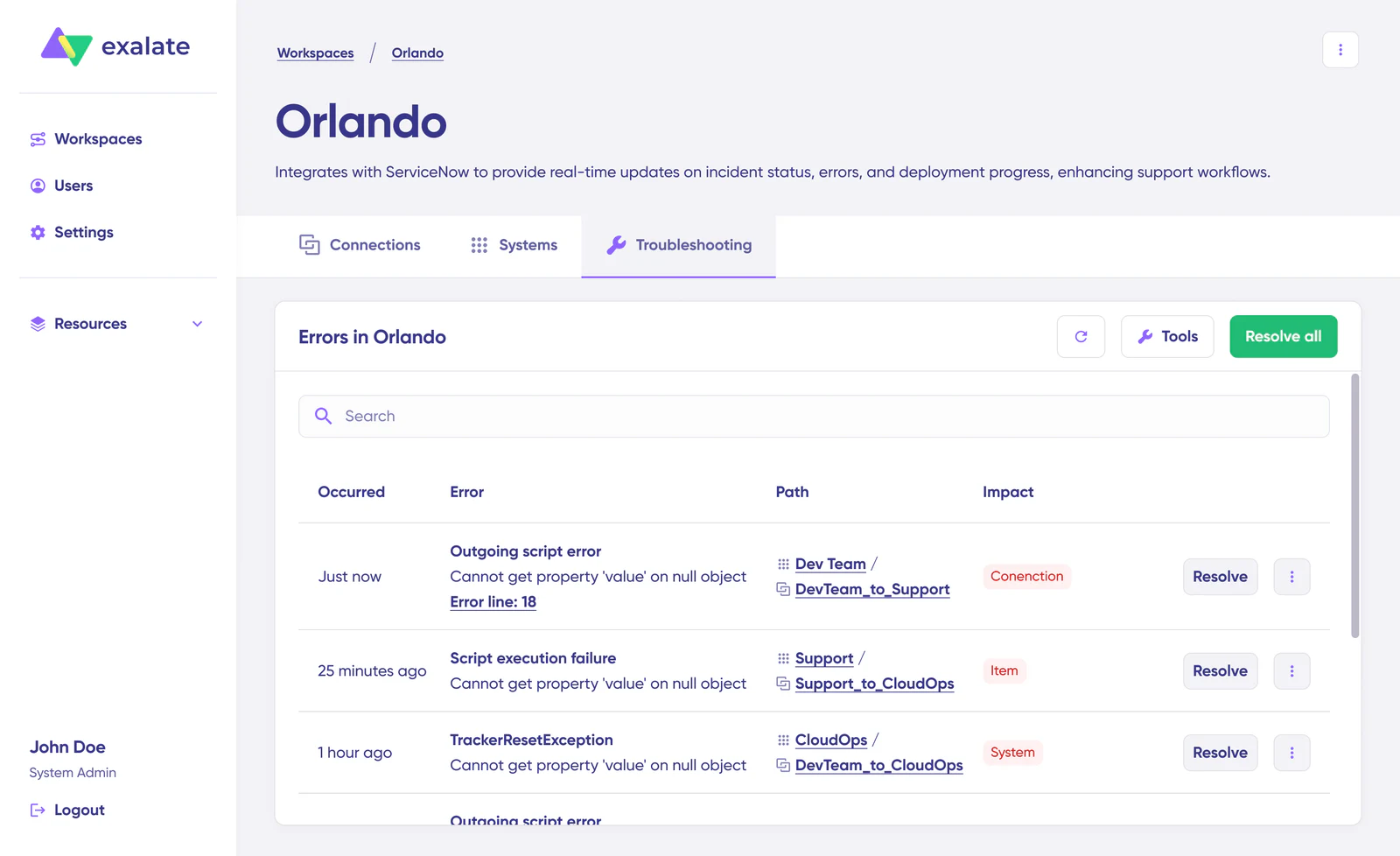
Monitoring, recovery, and evolution
Centralized supervision shows errors, their impact level, and recovery actions by connection to support diagnosis and day-to-day operations.
FAQ
Frequently asked questions about Exalate
Reliable synchronization depends less on the number of fields than on a clear exchange contract and sound operations.
Which tools can be connected with Exalate?
Exalate provides connectors including Jira, ServiceNow, Zendesk, Azure DevOps, Salesforce, GitHub, Freshdesk, and Freshservice. Availability and capabilities must be verified for the hosting models and versions in use.
Are Groovy rules required to use Exalate?
Not for every case. Some exchanges can start with guided mapping. Advanced transformations, detailed conditions, or specific business rules may require Groovy, with review and versioning.
Can synchronization run in one direction only?
Yes. The exchange contract can be inbound, outbound, or bidirectional. Each side defines the data it accepts to send or receive and the transformations applied.
How should errors, conflicts, and recovery be handled?
Monitoring, responsibilities, alerts, diagnostics, and suitable recovery actions must be defined. Conflict and field-change scenarios should be tested before go-live.
How can exchanged data be limited?
Each side can limit the objects, fields, comments, or attachments involved. Scoping should apply data minimization and account for permissions in each system.
Ovyka × Exalate
Need to scope or strengthen an Exalate synchronization?
Share the systems, objects to connect, and each team’s responsibilities. We will help define an exchange that can be tested, documented, and operated.
Atlassian Marketplace
Other Atlassian Marketplace partners
Complete Exalate with test management, time tracking, or identity.